Posts

How to perform workflow clear in OneStream ?

Recently we wanted to run a  "clear Import Data" from the WF, but it was clearing the data of the same entity from other WFs that was loaded . One of the things we tried was to  "CLEAR" the workflow, and it clears the data that is in the stage tables. If you want to clear the data in the cube, first clear the workflow and then click retransform, then validate and load.   This will Load nothing into the cube but clear the data that is in the cube.

OneStream V8+ upgrade and things to know about .NET

  .NET is the development platform used by OneStream to build the Platform.  Prior to Platform v8.0, OneStream used versions of .NET referred to as   .NET Framework   versions.  The v7.x Platform release used .NET 4.8.   The development of Platform v8.0 used .NET6, referred to as a . NET Core  version.  The .NET Core versions leverage modern development paradigms and are  much faster!   OneStream customers upgrading to Platform v8+ are observing performance improvements in memory intensive operations such as Consolidation processing, and several data loading / copying processes.   The modern paradigms of .NET Core had an impact on OneStream Business Rule compilation - older syntax and library references that were not .NET Core compatible failed compilation.  This required some minor updates to MP Solutions and customer created Business Rules.  No sweat - a one time adjustment with your pre-v8 to v8+ Platform upgr...

OneStream performance load testing tool for Desktop/Cloud application

Marketplace solution called load test suite and  System Diagnostics helps to monitor the health of the system.  The load test tool can help to generate multiple user activity on the One Stream cloud application.  The OSD (OS System Diagnostics) provide all the statistics about your application & infrastructure. Especially on DUCS and provide few recommendations on Member formula.  

OneStream migrating from on-premise to cloud - Recommendations

Depending on your application configuration and how much data are you trying to validate for historical purpose. The below are some steps required before the post migration to cloud: 1. If you are using Direct Connect then SIC should be configured. 2. Upgrade OS Marketplace solutions if any 3. Update to latest .NET Version. 4. Update to latest Excel Add-in 

OneStream and Excel addin reading an XFGetCell parameter values

Image
If you have a large Excel report built on XFGetCells, and trying to understand the dimensions that each XFGetCell is grabbing, it can take a long time to parse through an XFGetCell manually and make notes of each relevant dimension.  Open your Excel Addin. Go to  your XFGetCell, see below pic. By clicking on the fx, we can identify which dimension each member is related to. It will bring up this interface.  

OneStream Excel Addin and Formulas

How to keep Excel formulas intact, when refreshing Quick view with new PoV ? In the Quick View settings, at the top are two settings:  "Insert or Delete Rows (Columns) When Resizing Cube View content" Try turning both to "False"

Exporting data automatically to other systems, outside of OneStream

Image
Trying to automate a data extract process to send data from OneStream to another system eg ERP, Trintech, Anaplan etc.  Setup a data management job to export the data to a CSV on the file share.  Move that CSV file from the file share to my desktop for example (or any other file storage place).  You can use OneStream Business rule such as the Fdx functions within BRAPI, they are creating a data table object and they are retrieving the data very fast, they are all starting with BRApi.Import.Data.Fdx<Something> Screen shot below.

Hyperion HFM to OneStream Rules

Image
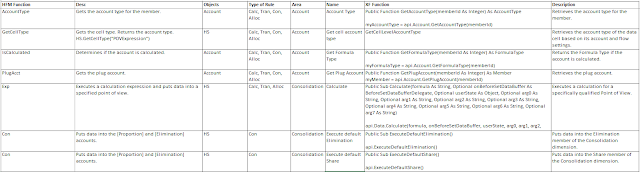
Following is a snippet that will  help plan rules from HFM to OneStream: Message me for the full file.

How to setup default home page for Users and OneStream logo ?

Image
If you are planning to build a default landing home page for users upon login, this is where the XML sits for that Dashboard. Follow the File Explorer path - Internal/Users/UserName, UserAppSettings.xml

OneStream Cloud application and Reset IIS pool steps

  Cloud Administration Tools Note this solution is only available for OneStream hosted cloud customers This is an XF MarketPlace solution that can be installed on OneStream version 4.3.x or higher. This option is available in the Windows Application and the Web Client. 1.  Once installed and set up, click Manage Applications . 2. Click the Show History Page button at the top right of the solution window. 3. As long as an application copy process isn't currently running, a Reset IIS button will be available. Click this to reset IIS on all servers. 4. You will then be presented with the following message, click confirm to reset IIS on all servers.

How to Recycle App Pool in OneStream windows application ?

Image
Goto Environment Tool Available from OneStream Version 5.0.x and only available within the Windows Application. 1. Within the Windows Application, go to System - Tools - Environment . 2. Within the Environment tool, find your Application Server Sets.  Expand if necessary and click on a server within the list of Application Servers that you wish to recycle. 3. Select the Behaviors tab and click the Recycle App Pool button to recycle the Application Pool (Reset IIS) on the selected server. Repeat these steps for any application servers that need their Application Pool recycled. NOTE: If the 'Recycle App Pool' button is not available, the field Can Recycle App Pool on Servers within the Application Server Configuration File needs to be set to 'True', this change needs to be saved to the file and IIS will need to be recycled for the change to take effect.

OneStream and How to recycle IIS Application Pools ?

There are three ways IIS Application Pools can be recycled (also known as resetting or restarting IIS) using OneStream. 1. Via the Windows App Environment Tool, available from version 5.x. This option is only available in the Windows Application client 2. Via System Diagnostics (minimum version 6.2) or Diagnostics 123, (minimum version 4.1)  These MarketPlace solutions can be run in the Windows App and the Web Client. 3. Via the Cloud Administration Tools XF MarketPlace solution, (minimum version 4.3.) This solution is available in the Windows Application and the Web Client. This is only available to customers hosted on OneStream Cloud. NOTE: Recycling an Application Pool will terminate all running processes on the servers included in the recycle process.

OneStream Business Rule Compile error and Assemblies not found error

Image
Recently I copied a BR and during the compile strange errors kept popping up about Assemblies not found. So after some research, it was noted that the Referenced Assemblies need to be validated within the BR Properties.  Sharing a quick screen shot of it. Highlighted yellow section is key to validate.

OneStream 8.0 Platform updates

  Platform 8.0: Gateway to OneStream's Next Generation Architecture https://vimeo.com/852454210/1b71410404?utm_campaign=Global%20WBN%20PR%20-%20OS%20Platform%20v8%20-%2011AUG2023&utm_medium=email&_hsmi=269649278&_hsenc=p2ANqtz--ZC5XHsU3WrwJFXMHztT4grUuDf3640Vg2aMYHh4pAmwBD8a4U_24rzn1gPvCjjHz3ulvzZ_wZ4V9pHSBzgou3Szy4GtpVGmumLp-Oqno9zOzr08w&utm_content=269649278&utm_source=hs_email

OneStream System Diagnostics May 2023

 Latest update on System Diagnostics within OneStream platform System Diagnostics will now run in SQL version 2016 or older. (MP3-3524) URL https://2020381.fs1.hubspotusercontent-na1.net/hubfs/2020381/OSD_PV6.2.0_SV201_ReleaseNotes.pdf?utm_medium=email&_hsmi=258518711&_hsenc=p2ANqtz-9LcQzemRJlPU95X3O_N57eHEZvnIOzE1_EwvLHzHN659Alk4R_xV9f-I7AawhEXAkF7n6XE_-0bRN7lcf_zzsiRTPH78k1zIxovpLMLNa6CBCcseA&utm_content=258518711&utm_source=hs_email

What are the steps to upgrade OneStream software ?

  OneStream upgrades are Fast and Simple 1 - Make sure all users are logged out 2 - Shut down IIS on Web Servers first, then on each App Servers 3 - Uninstall servers, Excel Add-in, and Studio 4 - Install Software 5 - Replace Config files with copies or reconfigure 6 - Update Databases to the latest version if required with OneStream Database Utility 7 - Restart IIS on all App Servers 8 - Restart IIS on all Web Servers 9 - Login and validate

OneStream Platform Release/Patching schedule for 2023 and beyond

Image
Latest OneStream platform release schedule.   Starting 2023, we will have 3 Releases per year. 

OneStream Platform 7.3.0

  Note:  The 7.3.0 upgrade requires a framework and application schema update. Workspaces:  Operate as the foundation for Dashboards and facilitate community development. Workspaces will continue to evolve into the framework that encapsulates artifacts needed to develop business solutions. Cube View Row Tree Expansion Mode : New Cube View properties used to indicate desired hierarchical expansion levels when using  .Tree  in Cube View rows. Sankey Diagram : New Dashboard Component used to enhance visualization for data flow analysis. https://2020381.fs1.hubspotusercontent-na1.net/hubfs/2020381/OneStream%20Version%207.3.0%20Release%20Notes.pdf?utm_medium=email&_hsmi=242019444&_hsenc=p2ANqtz-8P3kfZm68Dy6Hta94X9Ei1-GDOhNoYmNFVDfnI0pN5VdyEu8uRrSSjM6NqqnP5f7CJST7dOGnmnZ8Fdpr6eVgKu9g4vTN7w8_ETo_H2MGvm0d7B2k&utm_content=242019444&utm_source=hs_email

OneStream Log Cleaning Frequency for Audit purposes

OneStream MarketPlace provides   Log Cleaner tool to clean logs. You can select which type of activity to clean such as User Login, Task etc Some companies will run this every quarter and only retain minimum (30 days) logs while cleaning up all types except for user logon activity. If you are a public traded company, please use caution when clearing the error log, since this is where the system dashboard for Software Version Audit gets its information.  This can cause an issue with audit. Also, there is a default setting on your servers and those may be set low out of the box. 

OneStream System Administrator and System Health Check

OneStream Administrators can perform certain DIY (Do It Yourself) functions, that can be downloaded from the MarketPlace, called System Diagnostics Overview. This gives you the ability to diagnose metrics and data volumes that can effect your performance. You can perform Environment Analysis, Application Analysis, Task Analysis, and live monitoring.  You can also schedule snapshots, that can be analyzed at your convenience.  Another major feature is the ability to recycle applications servers.  This gives you the additional insight  for keeping a healthy environment for your end user community. Good Luck downloading and using it !!